选对图表类型
流程图并非万能 —— 请求/响应用时序图,生命周期用状态图,数据关系用 ER 图,分类体系用思维导图。
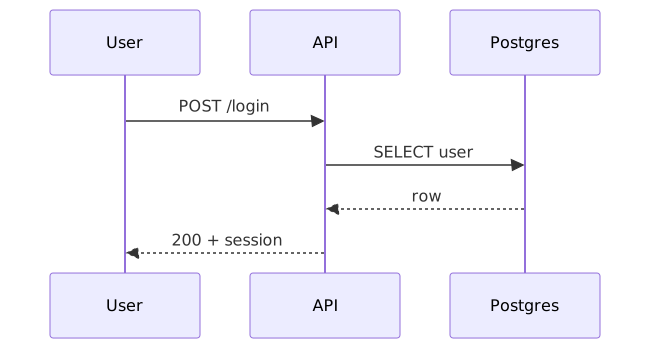
查看源码
mermaid
sequenceDiagram
  participant U as User
  participant API
  participant DB as Postgres
  U->>API: POST /login
  API->>DB: SELECT user
  DB-->>API: row
  API-->>U: 200 + session
提示词技巧
10 个可复制粘贴的提示词后缀,让 AI 为你生成更好的图表。
在颜色和布局之前 —— AI 怎么把图搭起来。
流程图并非万能 —— 请求/响应用时序图,生命周期用状态图,数据关系用 ER 图,分类体系用思维导图。
sequenceDiagram
participant U as User
participant API
participant DB as Postgres
U->>API: POST /login
API->>DB: SELECT user
DB-->>API: row
API-->>U: 200 + session
DiagramZu 会自动给分组上色;你只需要给分组命名。

flowchart TD
  A[Browser] --> B[CDN] --> C[Gateway]
  C --> D[Auth] & E[Billing]
  D & E --> F[(Postgres)]
  class A,B edge
  class C,D,E core
  class F data
subgraph 让「这是一个服务」「这是一个团队」一目了然。

flowchart LR
  subgraph client[Browser]
    UI[Web app]
  end
  subgraph services[Backend services]
    API[API gateway]
    AUTH[Auth]
    BILL[Billing]
  end
  subgraph data[Data]
    DB[(Postgres)]
  end
  UI --> API
  API --> AUTH & BILL
  AUTH & BILL --> DB
  class UI edge
  class API,AUTH,BILL core
  class DB data
管道和请求流用 LR,层级和决策用 TD。

flowchart LR
  A[Source] --> B[Transform] --> C[Validate] --> D[Sink]
  class A edge
  class B,C core
  class D data
怎样让每个节点和箭头都有承重作用,而不只是装饰。
「Stripe」胜过「支付提供商」;具体名字让图表更容易被引用。

flowchart LR
  U[User] --> APP[Web app]
  APP --> STRIPE[Stripe]
  APP --> POSTGRES[(Postgres)]
  APP --> S3[S3]
  class U edge
  class APP core
  class STRIPE,POSTGRES,S3 data
没标签的箭头只说「有东西过去了」;有标签的箭头才告诉你过去的是什么。

flowchart LR
  U[User] -- "submits form" --> API[API]
  API -- "validates" --> AUTH[Auth]
  AUTH -- "token" --> API
  API -- "writes row" --> DB[(Postgres)]
  class U edge
  class API,AUTH core
  class DB data
Mermaid 支持渲染标签里的 Unicode。给关键节点加一个 emoji,焦点立现。

flowchart LR
  U[User] --> APP[🔑 Auth gateway]
  APP --> SVC[Service]
  SVC --> DB[(💾 Postgres)]
  SVC --> AI[🤖 LLM]
  class U edge
  class APP,SVC core
  class DB,AI data
一张「啥都讲」的图等于啥也没讲。按问题拆开。

flowchart LR
  REQ[Request] --> AUTH[Auth check] --> HANDLER[Handler] --> RES[Response]
  class REQ edge
  class AUTH,HANDLER core
  class RES data
怎样把初稿改成真正拿得出手的图。
第一张图是草稿。像编辑文章那样编辑它。

flowchart TD
  V1[v1: flat] --> V2[v2: grouped] --> V3[v3: labeled] --> V4[v4: shipped]
  class V1 edge
  class V2,V3 core
  class V4 accent
幻灯片用 Midnight、文档用 Paper、自然/健康用 Forest、运维用 Ocean、印刷用 Mono。

flowchart LR
  SLIDES[📽 Slides] --> M[Midnight]
  DOCS[📄 Docs] --> P[Paper]
  PRINT[🖨 Print] --> MO[Mono]
  class SLIDES,DOCS,PRINT edge
  class M,P,MO core