PROMPT TIPS

Better prompts, better diagrams

Ten copy-paste prompt suffixes for getting better diagrams out of your AI.

Structure

Before color, before layout — how the AI shapes the diagram.

01

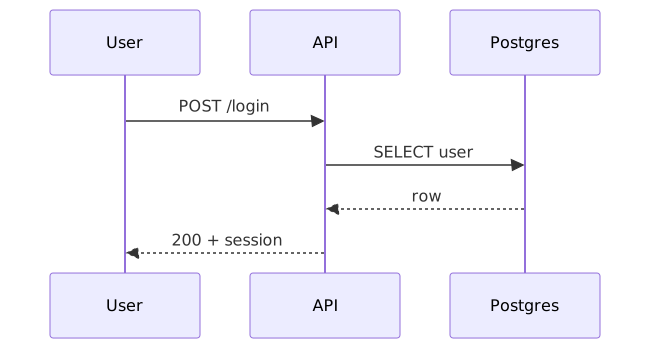
Pick the right diagram type

Flowcharts aren't always the answer — sequence for request/response, state for lifecycles, ER for data.

Sequence diagram showing a login flow between user, API, and Postgres.
View source
mermaid
sequenceDiagram
  participant U as User
  participant API
  participant DB as Postgres
  U->>API: POST /login
  API->>DB: SELECT user
  DB-->>API: row
  API-->>U: 200 + session
02

Group nodes by meaning

DiagramZu auto-colors groups; you just have to name them.

Flowchart with browser, CDN, gateway, auth, billing, and Postgres, color-grouped by responsibility.
View source
mermaid
flowchart TD
  A[Browser] --> B[CDN] --> C[Gateway]
  C --> D[Auth] & E[Billing]
  D & E --> F[(Postgres)]
  class A,B edge
  class C,D,E core
  class F data
03

Wrap boundaries in subgraphs

Subgraphs make "this is one service" / "this is one team" visually obvious.

Flowchart with three labeled subgraph boundaries: Browser, Backend services, Data.
View source
mermaid
flowchart LR
  subgraph client[Browser]
    UI[Web app]
  end
  subgraph services[Backend services]
    API[API gateway]
    AUTH[Auth]
    BILL[Billing]
  end
  subgraph data[Data]
    DB[(Postgres)]
  end
  UI --> API
  API --> AUTH & BILL
  AUTH & BILL --> DB
  class UI edge
  class API,AUTH,BILL core
  class DB data
04

Pick a layout direction

LR for pipelines and request flow, TD for hierarchies and decisions.

Four-node pipeline laid out left to right.
View source
mermaid
flowchart LR
  A[Source] --> B[Transform] --> C[Validate] --> D[Sink]
  class A edge
  class B,C core
  class D data

Clarity

How you make each node and arrow load-bearing instead of decorative.

05

Name things concretely

"Stripe" beats "Payment provider"; specific names make the diagram quotable.

Flowchart naming concrete services: Stripe, Postgres, S3.
View source
mermaid
flowchart LR
  U[User] --> APP[Web app]
  APP --> STRIPE[Stripe]
  APP --> POSTGRES[(Postgres)]
  APP --> S3[S3]
  class U edge
  class APP core
  class STRIPE,POSTGRES,S3 data
06

Label your edges

An unlabeled arrow says "something happens"; a labeled one teaches.

Flowchart with edge labels naming what flows across each arrow.
View source
mermaid
flowchart LR
  U[User] -- "submits form" --> API[API]
  API -- "validates" --> AUTH[Auth]
  AUTH -- "token" --> API
  API -- "writes row" --> DB[(Postgres)]
  class U edge
  class API,AUTH core
  class DB data
07

Use emoji as signposts

Mermaid renders unicode in labels. One emoji on a key node = instant focal point.

Flowchart with emoji on key nodes: 🔑 Auth gateway, 💾 Postgres, 🤖 LLM.
View source
mermaid
flowchart LR
  U[User] --> APP[🔑 Auth gateway]
  APP --> SVC[Service]
  SVC --> DB[(💾 Postgres)]
  SVC --> AI[🤖 LLM]
  class U edge
  class APP,SVC core
  class DB,AI data
08

One concern per diagram

A diagram of "everything" is a diagram of nothing. Split by question.

A single focused flowchart with four nodes for one request lifecycle.
View source
mermaid
flowchart LR
  REQ[Request] --> AUTH[Auth check] --> HANDLER[Handler] --> RES[Response]
  class REQ edge
  class AUTH,HANDLER core
  class RES data

Iterate

How the first draft becomes something you'd actually ship.

09

Refine, don't restart

The first diagram is a draft. Edit it the same way you'd edit prose.

Four diagram revisions showing progression from flat to shipped.
View source
mermaid
flowchart TD
  V1[v1: flat] --> V2[v2: grouped] --> V3[v3: labeled] --> V4[v4: shipped]
  class V1 edge
  class V2,V3 core
  class V4 accent
10

Pair the right style

Midnight for slides, Paper for docs, Forest for nature/health, Ocean for ops, Mono for print.

Three media types mapped to three DiagramZu style presets.
View source
mermaid
flowchart LR
  SLIDES[📽 Slides] --> M[Midnight]
  DOCS[📄 Docs] --> P[Paper]
  PRINT[🖨 Print] --> MO[Mono]
  class SLIDES,DOCS,PRINT edge
  class M,P,MO core