MCP server + shared workspace
The diagram your AI drew, at a link that outlives the chat.
DiagramZu isn't a Mermaid editor, and it isn't an in-chat renderer. It's where your AI saves the diagram, and where your team reads it. No LLM runs in the app.
Plan mode hands you 600 lines of prose describing an architecture. You skim it and approve something you don't fully understand. The same architecture as a diagram takes ten seconds to read — and DiagramZu keeps it at a link, long after the conversation is gone.

Diagrams die in screenshots.
- Lost in chat history
- The diagram your AI drew is buried three days deep in a conversation nobody will scroll back to.
- Stale the moment it ships
- A PNG pasted into a doc can't be redrawn once the code leaves it behind.
- Impossible to hand off
- New engineers can't see how the system fits together without working it out from scratch.
how it connects
From prompt to shared diagram in three steps.
Fourteen MCP tools: search, create, read and update diagrams, browse folders, trace version history, build decks, leave comments, and analyze a rendered diagram for problems. Claude Code, Cursor, and every other MCP client write here directly — no copy-paste, and no LLM inside the app.
01
Your AI writes it; DiagramZu draws it.
Claude Code, Cursor, or any MCP client writes the Mermaid and saves it here. Each diagram arrives with a description the next AI can read.
Add to Claude Codeclaude mcp add --scope user --transport http diagramzu https://mcp.diagramzu.ai/mcp \ --header "Authorization: Bearer dz_live_xxx"02
You review the picture, not the code.
Open the diagram, pan and zoom, hover a node to trace its path, switch the layout, and edit the source side by side when you need to. Every save is a snapshot.
> create_diagram("Auth flow", ...)

Created: 6f2a1c84-...
Open (space members only): https://diagramzu.ai/app/d/6f2a1c84-...
03
You hand the team a link.
One public link, pan-and-zoomable, no login. The version history travels with it.
Works with Claude Code, Cursor, ChatGPT, and any MCP client.
One-click in Claude Claude users can add DiagramZu as a custom connector and authorize it with their account — no API token to copy. Token setup still covers Cursor, ChatGPT, and every other MCP client.
Sign up free — get your tokenembed anywhere
One iframe. Always the current diagram.
Paste one iframe and the diagram renders in place — pan-and-zoom, theme-matched, always current — in your docs, Notion, blog, or wiki. Every embed links back to the live diagram, and you can see how often it loaded in the last 7 days.
<iframe src="https://diagramzu.ai/embed/your-diagram" width="100%" height="480" style="border:0;border-radius:8px" loading="lazy" title="diagramzu diagram"></iframe>what it's for
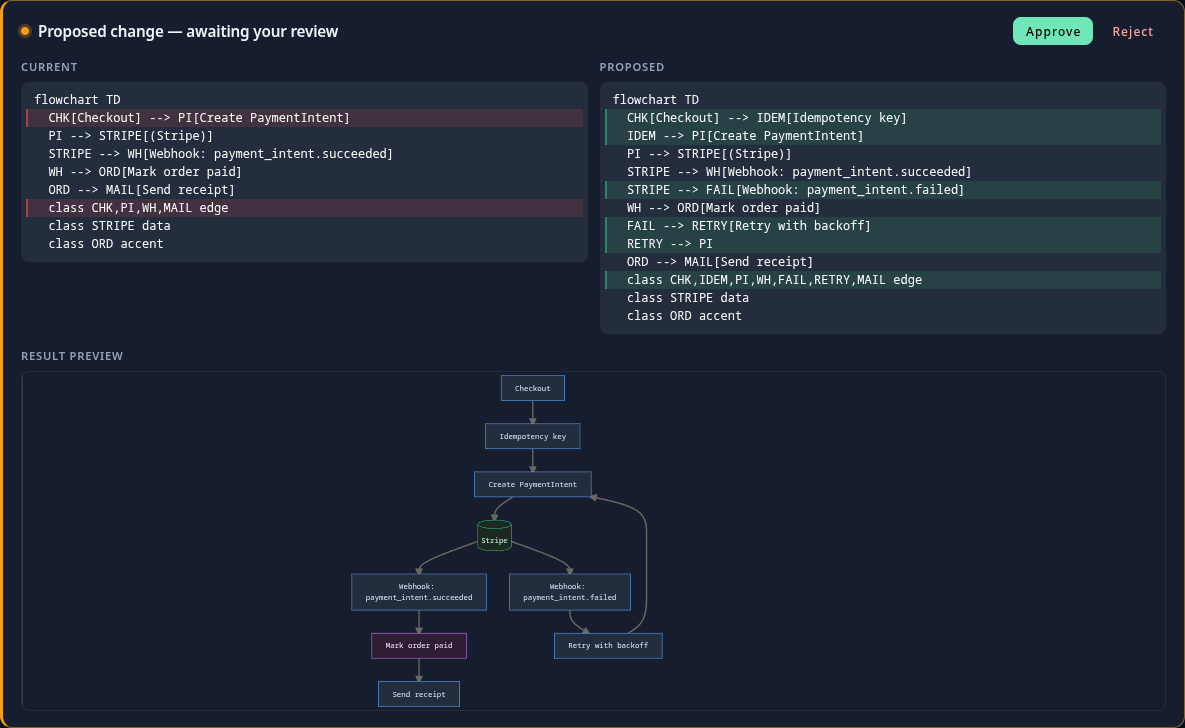
Review AI proposals
Reading a diagram beats reading 600 lines of AI-written prose. Turn on review and an AI's edit waits as a proposal — see the diff, then approve or reject it before anything is overwritten.
- Hand architecture to the team
- One shareable link. The version history records how the system evolved, so new engineers get a map that's still true — not a stale wiki.
- Reuse in presentations
- The diagram your CTO reviewed is the one in the CEO's deck. One source of truth from engineering to the boardroom.
- Every change, kept
- Every save is a versioned snapshot. Open the history to see how the architecture evolved, what your AI changed last Tuesday, and why. The diagram becomes the record — readable now by your team, and later by the next AI.
Inside your space.
- Folders
- Nest and organize diagrams inside each space.
- Public sharing
- View-only links with pan and zoom. No account required.
- Multi-language
- English, 繁體中文, 简体中文, and 日本語 out of the box.
- Search
- Find a diagram anywhere in the space — by title, description, or source — from the filter bar or ⌘K / Ctrl+K.
- Layout engines
- Leave layout unset and the server picks between Dagre and five ELK algorithms based on the diagram's shape. You can still set the engine, spacing, and curve per diagram.
- Diagram analysis
- Your AI can call analyze_diagram for a structural read of a flowchart — orphan nodes, over-connected hubs, cycles, disconnected clusters — feedback on the graph, not just the text.
- Hover to trace
- Hover a node on a flowchart or ER diagram and the rest fades back, leaving the path that node sits on.
- Decks
- Order several diagrams into a deck and present them full-screen — the same source your engineers reviewed, ready for the meeting.
- Comments
- Pin comments to any node to review an AI's diagram together, then clear them once the design settles.
- Propose before overwrite
- A substantial AI rewrite can arrive as a diff. You approve or reject it, and the live diagram doesn't change until you do.
- Export
- Download SVG or PNG, or a portable bundle holding the rendered view, the Mermaid source, and where it came from.
- Styles
- Five presets (midnight, paper, forest, ocean, mono) plus spacing, line, and arrow controls — colors chosen to work together, not a pile of one-off shades.
Not mermaid.live. Not an in-chat renderer.
- Why not paste a screenshot in a doc?
- A PNG can't redraw itself when the code changes, and nobody can edit it. DiagramZu keeps the source, so the diagram is re-themed, re-laid-out, and current every time you open it.
- Why not use a local render tool?
- Local Mermaid tools draw the diagram and forget it — nothing persists, nothing is shareable. DiagramZu is where it stays once the session ends: one link, full history, no login to view.
- Why not type prompts into another diagram app?
- Your AI already drew the diagram while doing the real work. DiagramZu catches it over MCP, so you never retype the prompt into a second tool where AI is an afterthought.